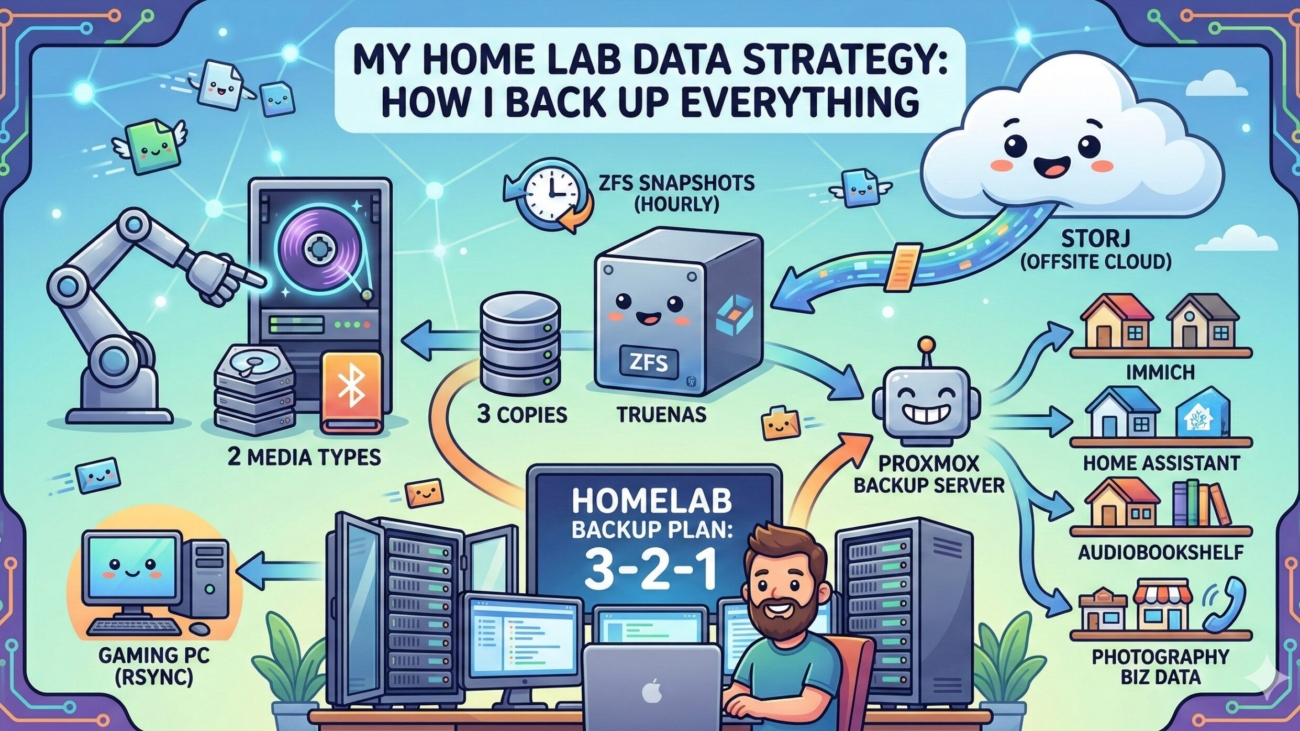
I’ve been running a home lab for a while now, and one of the things I take seriously is making sure my data doesn’t disappear. Whether it’s personal files, my wife’s photography business, our home automation setup, or even the systems running at my mom’s store — everything has a backup plan. In this post, I want to walk through my current setup, the thinking behind it, and the tools I use to keep it all safe.
Fair warning: this goes pretty deep. I’ll explain the jargon as I go, but this post is aimed at people who are comfortable around servers and self-hosting.
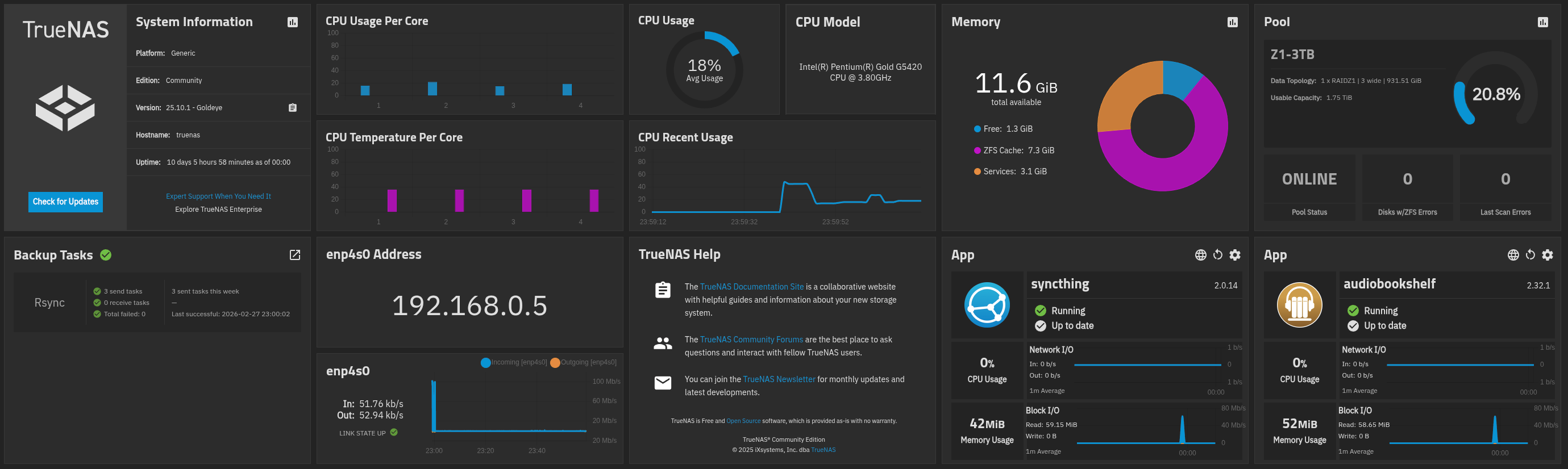
The Core Philosophy: 3-2-1 Backups
Everything I do is loosely based on the 3-2-1 backup rule. The idea is simple:
- 3 copies of your data
- 2 different storage media
- 1 copy offsite
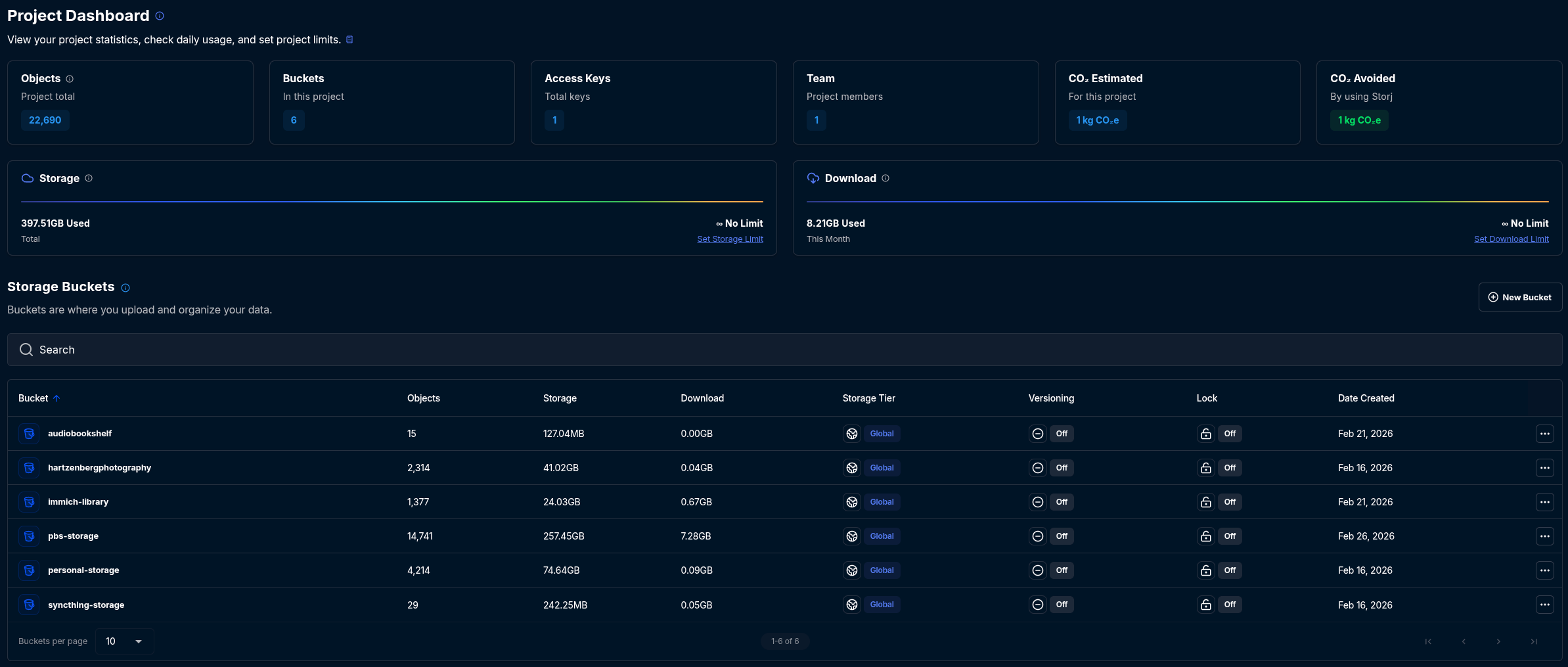
In practice, my “offsite” copy lives in the cloud via Storj — a decentralised, S3-compatible object storage service. My on-site copies are spread across my TrueNAS server, a spare hard drive in my gaming PC, and USB drives attached to my Proxmox hosts. Not every piece of data hits all three in the same way, but the principle guides every decision.
The Backbone: TrueNAS
TrueNAS is the heart of my storage infrastructure. It’s an open-source NAS (Network Attached Storage) operating system built on ZFS — a filesystem known for its data integrity features and snapshot capabilities. Everything either lives on TrueNAS, or gets backed up to TrueNAS before heading offsite.
The rule I follow is straightforward:
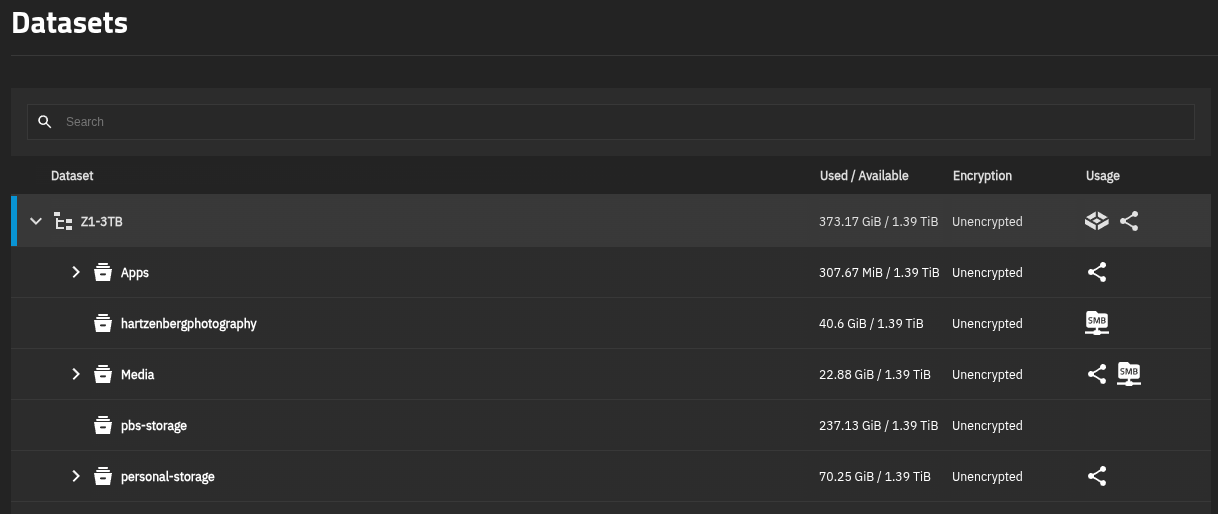
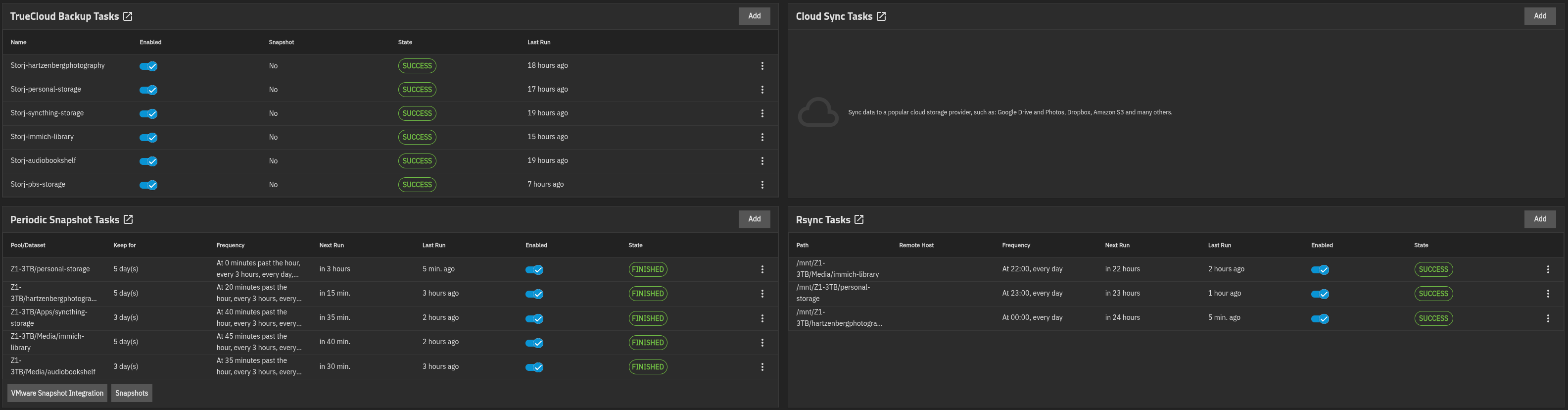
If it doesn’t live on TrueNAS, it gets backed up to TrueNAS first, then to Storj. If it does live on TrueNAS, it gets backed up to my gaming PC via Rsync AND to Storj directly from TrueNAS.
Let’s look at the datasets I have on TrueNAS and what lives in each one.
pbs-storage
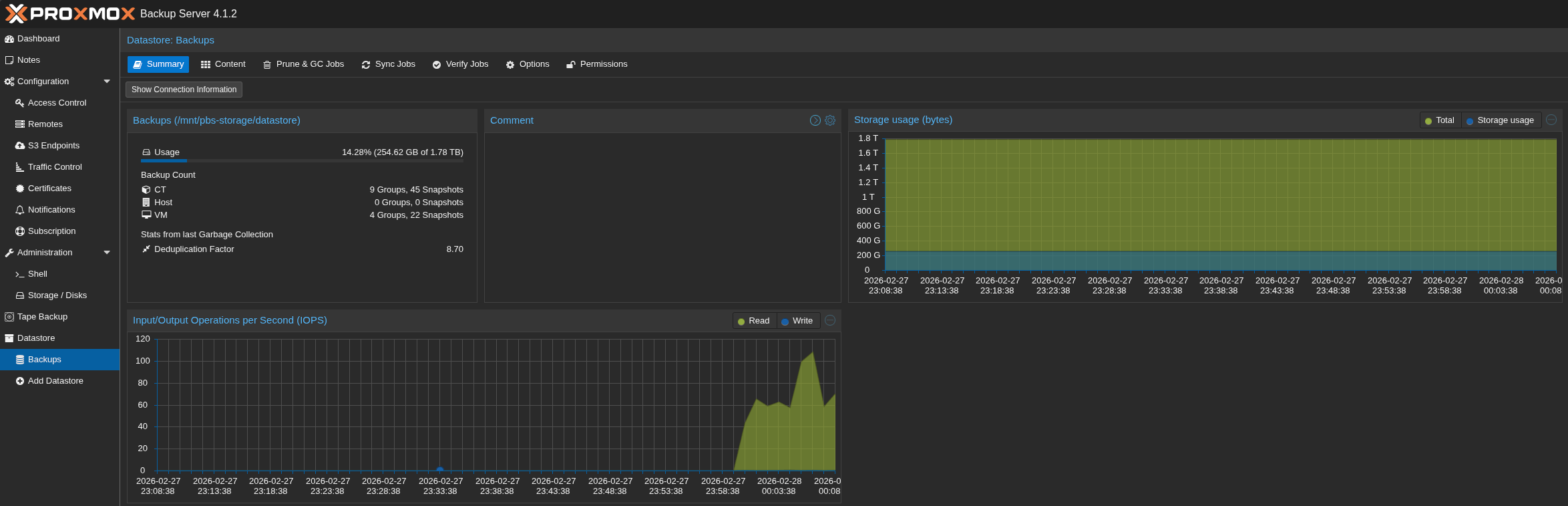
This dataset is dedicated to Proxmox Backup Server (PBS), which runs as a container directly on TrueNAS. PBS is where all my Proxmox VMs and containers get backed up. I’ll cover the Proxmox side in more detail shortly, but the key point is that this entire dataset — containing backups of everything running in my home lab — also gets replicated to Storj.
One deliberate scheduling detail here: the daily Storj sync for pbs-storage is set to run after PBS has already completed its daily prune and garbage collection jobs. Prune removes old backup snapshots that have aged out of the retention policy, and garbage collection then cleans up any orphaned data chunks that are no longer referenced. By syncing to Storj only after both jobs have finished, I avoid uploading data that would just be pruned away anyway — keeping the cloud backup lean and avoiding unnecessary egress costs.
Media
This is where the libraries for Audiobookshelf (my self-hosted audiobook and podcast server) and Immich (my self-hosted Google Photos replacement) actually live. Since the data resides on TrueNAS, it gets backed up to my gaming PC’s spare 1TB HDD via Rsync, and separately backed up to Storj.
personal-storage
General personal files. Same story — lives on TrueNAS, backed up to the gaming PC via Rsync and to Storj.
hartzenbergphotography
This is a dedicated dataset for my wife’s photography business. The website itself runs as a WordPress Docker container on one of my Proxmox LXC containers, but the actual completed and edited photos are stored here on TrueNAS. Given how irreplaceable this data is, it follows the same dual backup path: gaming PC via Rsync and Storj from TrueNAS.
ZFS Snapshots: The First Line of Defence
Before data even leaves TrueNAS for Rsync or Storj, there’s already a fast recovery option built right into the filesystem itself: ZFS snapshots.
A ZFS snapshot is a point-in-time, read-only copy of a dataset. Crucially, it’s not a separate copy of your data — it’s stored on the same pool, which means it doesn’t double your storage usage (at least not immediately). What it gives you is the ability to roll back a dataset to exactly how it looked at a specific moment in time, almost instantly. Accidentally deleted a folder? Overwrote a file? A snapshot lets you recover it in seconds without touching your off-site backups at all.
Every dataset on my TrueNAS — pbs-storage, Media, personal-storage, and hartzenbergphotography — gets snapshotted automatically on an hourly schedule. The snapshots are staggered across the hour (some at :00, some at :20, some at :40, and so on) to avoid all datasets hammering the disks at once. Each dataset retains approximately 3 days’ worth of snapshots before older ones are automatically pruned.
It’s worth being clear about what snapshots are not: they aren’t a substitute for backups. If the TrueNAS pool itself fails — a drive dies, the system is stolen, there’s a fire — the snapshots go with it. That’s precisely why everything still gets replicated to the gaming PC and to Storj. Think of snapshots as a rapid-recovery tool for everyday mistakes, sitting in front of the more robust (but slower to restore from) backup layers behind it.
Proxmox: My Virtualisation Layer
Proxmox VE is an open-source virtualisation platform that lets you run both VMs (Virtual Machines) and LXC containers side by side. I run two separate Proxmox hosts — one at home and one at my mom’s store.
My Home Proxmox Host
This host runs the bulk of my personal infrastructure:
- 4 × LXC containers for Docker — these run services like Ollama with OpenWebUI (local AI), Immich, my various websites (including my wife’s photography site), Nginx Proxy Manager, and various other services (including the WordPress container running this very website!).
- 1 × VM for Home Assistant — my home automation hub.
- 1 × Windows 10 VM for work — my day-job machine, which also gets backed up to PBS and ultimately to Storj. It runs on its own dedicated SSD, so if the Proxmox host ever dies I can pull the drive, plug it into any PC, and boot straight into Windows without needing a restore.
All VMs and containers on this host get backed up in two ways:
- To a locally attached USB hard drive — a quick, local safety net.
- To Proxmox Backup Server — which, as mentioned, runs as a container on TrueNAS and stores everything in the
pbs-storagedataset.
Home Assistant adds an extra layer by doing its own native backups directly to a dedicated share on TrueNAS, which then gets swept up into the Storj backup job. So Home Assistant config has three backup paths in total.
My Mom’s Store Proxmox Host
This host handles the IT infrastructure for my mom’s business. It runs:
- 1 × LXC for Docker — running AdGuard Home (DNS-level ad blocking), Cloudflared (DNS-over-HTTPS tunnel), and a couple of other services.
- 1 × VM for Active Directory — yes, running on Ubuntu with Samba AD. It works.
- 1 × VM for 3CX PBX — the store’s phone system.
- 1 × Windows 11 VM for SQL Server — the store’s database backend.
Like my home host, all VMs and containers get backed up to a local USB hard drive and to the same PBS instance. My two hosts are kept in separate namespaces within the PBS datastore, which keeps things organised and prevents one host’s backups from interfering with the other’s retention policies.
The one exception is the SQL Server VM. The full VM only gets backed up to the local USB drive — it doesn’t go to PBS. Instead, the SQL database itself gets backed up separately to the office computer on-site. That office computer then syncs those database backups over the VPN to my TrueNAS, where they get swept up into the Storj cloud backup. It’s a longer chain, but it keeps a clean, restorable database backup independent of the full VM snapshot.
The Full Picture: A Diagram
Here’s a text-based overview of how all the backup flows connect:
┌─────────────────────────────────────────────────────────────────┐
│                        STORJ (Cloud / Offsite)                  │
└───────────┬─────────────────────────────────────────────────────┘
            │ (all TrueNAS datasets sync to Storj)
            │
┌───────────▼──────────────────────────────────────────────────────────────┐
│                            TrueNAS (NAS)                                 │
│  Datasets:                                                               │
│  ├── pbs-storage  (Proxmox Backup Server lives here)                     │
│  ├── Media        (Audiobookshelf + Immich libraries)                    │
│  ├── personal-storage                                                    │
│  └── hartzenbergphotography                                              │
│                                                                          │
│  ZFS Snapshots (all datasets, hourly, ~3 days retention)                 │
│  ├── :00 past the hour ──► snapshot                                      │
│  ├── :20 past the hour ──► snapshot  (staggered per dataset)             │
│  └── :40 past the hour ──► snapshot                                      │
│  [on-pool — fast recovery for accidental deletion / corruption]          │
└──────┬─────────────────────┬────────────────────────────────────────────┘
       │                     │
       │ Rsync               │ PBS backups received from both Proxmox hosts
       │                     │
┌──────▼────────┐    ┌───────▼──────────────────────────────────────────────┐
│  Gaming PC    │    │           Proxmox Backup Server (PBS)                │
│  (1TB HDD)    │    │  (runs as container on TrueNAS, pbs-storage dataset) │
│               │    │  ├── Namespace: Home Host                            │
│  Rsync from:  │    │  └── Namespace: Mom's Store Host                     │
│  - Media      │    └───────────┬──────────────────────────────────────────┘
│  - personal   │                │ backups from
│  - hartz..    │        ┌───────┴────────────────────────────┐
└───────────────┘        │                                    │
                  ┌──────▼──────────┐                ┌────────▼──────────┐
                  │  Proxmox Host   │                │  Proxmox Host     │
                  │   (Home)        │                │  (Mom's Store)    │
                  │                 │                │                   │
                  │  - 4x LXC       │                │  - 1x LXC Docker  │
                  │    (Docker)     │                │  - AD Controller  │
                  │  - Home Asst VM │                │  - 3CX PBX VM     │
                  │  - Win10 VM     │                │  - SQL Server VM* │
                  │    (work, own   │                │                   │
                  │     SSD)        │                │                   │
                  │                 │                │                   │
                  │  ┌──────────┐   │                │                   │
                  │  │ USB HDD  │   │                │  ┌──────────┐     │
                  │  │ (local)  │   │                │  │ USB HDD  │     │
                  │  └──────────┘   │                │  │ (local)  │     │
                  └─────────────────┘                │  └──────────┘     │
                                                     └────────────────────┘

  Home Assistant ──────────────────────────────► TrueNAS share ──► Storj
  (native backups)

  * SQL Server VM: Full VM → USB HDD only (no PBS)
    SQL DB files → Office PC → VPN → TrueNAS → Storj
Why This Setup?
A few decisions here were intentional and worth explaining.
Why run PBS on TrueNAS? PBS needs somewhere reliable to store data, and TrueNAS with ZFS is exactly that. Running PBS as an LXC container on TrueNAS means I get PBS’s deduplication and compression on top of ZFS’s integrity guarantees, and I only need one machine to be “always on” for both the NAS and the backup server roles.
Why schedule the Storj sync after PBS prune and garbage collection? PBS’s prune job removes old snapshots that have exceeded the retention policy, and garbage collection then purges any data chunks that are no longer referenced by any snapshot. If I synced to Storj before those jobs ran, I’d be uploading data that is about to be deleted anyway — wasting both upload bandwidth and cloud storage. Running the sync last means only the data I actually intend to keep gets sent offsite.
Why separate namespaces in PBS for the two hosts? Namespaces let me set different retention policies per host without them affecting each other. My home lab might get more frequent snapshots and shorter retention, while the store host gets longer retention for compliance purposes.
Why Rsync to the gaming PC instead of a dedicated backup server? Honestly, convenience and cost. My gaming PC already has a spare 1TB drive sitting in it, and it’s on most of the time. Rsync is simple, fast, and doesn’t require any additional hardware investment. It’s not a perfect solution — if the PC is off during the scheduled sync, the backup doesn’t run — but it’s a pragmatic one.
Why Storj for cloud storage? Storj is S3-compatible (so TrueNAS can talk to it natively via its Cloud Sync Tasks), it’s generally cheaper per GB than AWS S3 or Backblaze B2 for my usage pattern, and the decentralised architecture means my data isn’t sitting in a single data centre.
Why bother with ZFS snapshots if you already have Rsync and Storj? Speed and convenience. If I accidentally delete a file or a service corrupts its config, the last thing I want to do is kick off a restore from Storj or even from the gaming PC. ZFS snapshots let me roll back a specific file or an entire dataset to an hour ago in a matter of seconds, without touching the broader backup chain at all. They’re the “undo button” that the slower, more durable backups can’t easily be.
Why back up the SQL database separately from the VM? VM snapshots are great for disaster recovery — if the whole machine blows up, you restore the VM. But SQL Server’s VSS integration aside, a proper database backup (via SQL Server’s own backup mechanism) gives you a cleaner, smaller, more portable restore target. If I just need to recover a table or a day’s worth of records, I don’t want to restore an entire VM to do it.
What’s Still Missing?
No setup is perfect, and I’ll be the first to admit mine has gaps. The gaming PC Rsync dependency on the PC being online is one. I don’t currently have automated restore testing in place — I rely on periodic manual checks. And the SQL backup chain (office PC → VPN → TrueNAS → Storj) has more links than I’d like, which means more failure points.
These are things I’m actively thinking about improving. But the core philosophy holds: anything important has at least two on-site copies and one offsite copy, on different media, with at least one path that doesn’t require manual intervention.
Tools mentioned in this post: TrueNAS, Proxmox VE, Proxmox Backup Server, Storj, Immich, Audiobookshelf, Home Assistant