
TL;DR: I set up Invoice Ninja for my business invoicing needs. After logging in, refreshing the page would immediately kick me back to the login screen. After a deep troubleshooting session, the culprit turned out to be a CrowdSec AppSec rule designed for Langflow AI — misfiring on Invoice Ninja’s /api/v1/refresh endpoint. Here’s exactly how I found it and fixed it.
Background: Self-Hosting My Own Invoicing
As a freelancer, I needed a clean invoicing solution. Rather than paying monthly fees for hosted software, I decided to self-host Invoice Ninja — an open-source invoicing platform built on Laravel. It supports multi-currency, client portals, recurring invoices, and everything else a small business needs.
My self-hosting stack runs on a Proxmox server with Docker managed via Dockge. All services sit behind NPMPlus (an enhanced fork of Nginx Proxy Manager) with CrowdSec integrated for automated threat detection. If you want to know more about that setup, I wrote a full walkthrough here:
👉 Migrating from Nginx Proxy Manager to NPMPlus with CrowdSec: A Complete Walkthrough
The Problem: Logged Out on Every Refresh
After getting Invoice Ninja up and running, I noticed something immediately annoying — every time I refreshed the page, I’d be kicked back to the login screen with this error:
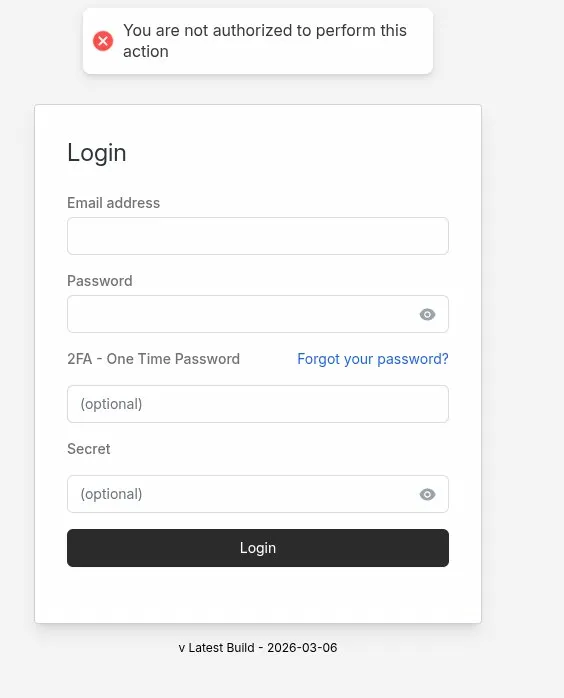
My setup is: Cloudflare (DNS proxy) → NPMPlus (reverse proxy) → Docker (Invoice Ninja). This triple-proxy chain is a common source of session issues in Laravel apps, so I started there.
What I Tried First (The Usual Suspects)
1. Environment Variables
For Laravel apps running behind a reverse proxy in Docker, there are several important .env settings. I verified and added all of these:
IS_DOCKER=true
SESSION_DRIVER=file
TRUSTED_PROXIES=*
REQUIRE_HTTPS=true
SESSION_SECURE_COOKIE=true
SESSION_DOMAIN=invoices.yourdomain.com
SESSION_SAME_SITE=none
APP_URL=https://invoices.yourdomain.com
None of these fixed it.
2. Mounting the .env File Into the Container
Invoice Ninja’s Docker image uses env_file to inject variables, but Laravel also needs to read the .env file directly from disk for certain operations. I confirmed the container couldn’t find it via the logs:
production.ERROR: file_get_contents(/var/www/app/.env):
Failed to open stream: No such file or directory
The fix was adding a bind mount to the compose file:
volumes:
  - ./.env:/var/www/app/.env:ro   # Add this line
  - ./public:/var/www/app/public:rw,delegated
  - ./storage:/var/www/app/storage:rw,delegated
⚠️ Pitfall: This is easy to miss. Invoice Ninja’s Docker docs show
env_fileusage, but Laravel also needs the actual.envfile present on disk inside the container. Without it, some operations silently fail.
Still logging me out on refresh.
3. Cloudflare SSL Mode
A classic cause of session issues is Cloudflare set to Flexible SSL mode. With Flexible, Cloudflare talks HTTP to your origin while the browser thinks it’s on HTTPS — so the secure cookie never matches. I confirmed mine was already set to Full (strict), so this wasn’t the issue.
4. Nginx Proxy Manager Headers
I also verified NPMPlus was correctly forwarding the required headers in the Advanced tab of the proxy host:
proxy_set_header X-Forwarded-For $proxy_add_x_forwarded_for;
proxy_set_header X-Forwarded-Proto $scheme;
proxy_set_header X-Real-IP $remote_addr;
proxy_set_header Host $host;
Still no luck.
Going Deeper: Checking the Logs
With all the obvious fixes exhausted, I dug into the actual Laravel logs:
docker exec -it ninja-app tail -f storage/logs/laravel.logNothing useful was appearing — the log wasn’t updating at all when I reproduced the error. I then checked the container’s stderr output instead:
docker logs -f ninja-appAll requests were returning HTTP 200. No errors. The server was completely happy — which meant the problem wasn’t server-side at all. Something was interfering between the browser and the app after the response was sent.
The Real Culprit: CrowdSec
While digging further, I checked the CrowdSec dashboard — and spotted something immediately:

My own local IP address (192.168.x.x) was being flagged — repeatedly — by the scenario crowdsecurity/vpatch-CVE-2025-34291, targeting the URI /api/v1/refresh.
Invoice Ninja’s Flutter frontend makes a burst of API calls when you load a page — including a call to /api/v1/refresh to check for data updates. CrowdSec was seeing this, matching it against a security rule, and issuing a block. Every page refresh triggered the pattern, causing a 403 Forbidden response, which Laravel interpreted as an authentication failure and redirected back to the login page.
What Is CVE-2025-34291?
Here’s the ironic part: CVE-2025-34291 has nothing to do with Invoice Ninja. It’s a CORS misconfiguration vulnerability in Langflow — an AI workflow platform. The vulnerable endpoint in Langflow happens to also be called /api/v1/refresh.
CrowdSec’s AppSec rule for this CVE matches any request where:
- The URI contains
/api/v1/refresh, AND - The request includes an
Originheader containinghttps://
Invoice Ninja’s app sends exactly this — a refresh call to /api/v1/refresh with an https:// origin header. It’s a textbook false positive.
The Fix: Modifying the AppSec Rule
Rather than disabling the rule entirely (which would leave real Langflow instances unprotected), I modified it to exclude my Invoice Ninja domain. The fix adds a third condition to the rule’s and logic: only trigger if the host is NOT my Invoice Ninja domain.
Step 1: Find the Rule File
docker exec -it crowdsec find / -name "vpatch-CVE-2025-34291.yaml" 2>/dev/null
# Result: /etc/crowdsec/hub/appsec-rules/crowdsecurity/vpatch-CVE-2025-34291.yaml
Step 2: Copy It to Your Host Config Directory
Copying the file to your host config directory means it overrides the hub version, and your changes survive container restarts and image updates.
docker cp crowdsec:/etc/crowdsec/hub/appsec-rules/crowdsecurity/vpatch-CVE-2025-34291.yaml \
  /opt/stacks/npmplus/crowdsec/conf/appsec-rules/vpatch-CVE-2025-34291.yaml
Step 3: Edit the Rule
Open the file and add a third condition to the and block, right before the labels section. Here’s the complete modified rule — replace invoices.yourdomain.com with your own Invoice Ninja domain:
## autogenerated on 2026-01-14 14:58:09
name: crowdsecurity/vpatch-CVE-2025-34291
description: 'Detects CORS misconfiguration in Langflow AI allowing any origin with credentials (CVE-2025-34291)'
rules:
  - and:
      - zones:
          - URI
        transform:
          - lowercase
        match:
          type: contains
          value: /api/v1/refresh
      - zones:
          - HEADERS
        variables:
          - origin
        transform:
          - lowercase
        match:
          type: contains
          value: https://
      - zones:
          - HEADERS
        variables:
          - host
        transform:
          - lowercase
        match:
          type: equals
          value: invoices.yourdomain.com   # <-- Replace with your Invoice Ninja domain
        negate: true
labels:
  type: exploit
  service: http
  confidence: 3
  spoofable: 0
  behavior: 'http:exploit'
  label: 'Langflow AI - CORS Misconfiguration'
  classification:
    - cve.CVE-2025-34291
    - attack.T1190
    - cwe.CWE-942
Step 4: Restart CrowdSec
docker restart crowdsec💡 Tip: Files placed in your host config directory (
/opt/stacks/npmplus/crowdsec/conf/appsec-rules/) take precedence over the hub versions inside the container. This means your customised rule persists through updates.
Verifying the Fix
After restarting CrowdSec, I logged into Invoice Ninja and refreshed the page. No logout. Refreshed again. Still logged in. The rule is still active for everything else:
docker exec -it crowdsec cscli scenarios list | grep vpatch
# crowdsecurity/appsec-vpatch   ✔️  enabled
Lessons Learned
- Check your security stack early. I spent a long time troubleshooting
.envsettings and proxy headers before thinking to look at CrowdSec. It should have been one of the first things I checked. - Security tools can cause mysterious application behaviour. CrowdSec was doing exactly what it was configured to do — the rule was just too broad in its pattern matching.
- False positives in AppSec rules are common. CVE rules that match on URL path patterns will inevitably catch legitimate apps that share similar endpoint naming conventions.
- Targeted exclusions beat disabling rules. Instead of turning off the protection entirely, a host-based
negatecondition keeps the rule effective for its actual target while excluding your app. docker logs -fis your friend. When Laravel logs show nothing, the container’s stderr output often tells a completely different story.
If you’re running Invoice Ninja behind NPMPlus with CrowdSec and experiencing the same issue, I hope this saves you a few hours of head-scratching. The fix takes about two minutes once you know what you’re looking for.