A week ago I wrote about giving Claude its own container and making it my bookkeeper. It worked. It cleared a two-year backlog of expenses in Invoice Ninja, it files the boring monthly invoices by itself every morning, and it asks me before it touches anything it isn’t sure about.
But living with it for a week showed me where it was weak:
- Receipts lived in folders. An
inbox/folder in, adone/folder out. Nothing was searchable, and the only thing that knew what was in each file was the agent. - Claude read every image itself. Every phone photo of a till slip went to Claude. That works, but on a Pro subscription it’s usage I’d rather spend on judgement than on reading.
- Everything else had no home. Insurance letters, warranties, SARS paperwork and medical slips were still scattered across my PC and my phone.
So this post is the upgrade: Paperless-ngx becomes the filing cabinet for every document I own, a local vision model on my homelab GPU reads and labels everything, and the Claude agent only does what it’s actually good at: the books.
The idea: split the work three ways
The core of the redesign is that each part does one job and hands over through Paperless:
| Part | Does | Never does |
|---|---|---|
| Paperless-ngx | Stores every original on my NAS, search, workflows, permissions, file naming | OCR itself (switched off) |
| paperless-gpt + qwen3-vl (local) | OCR of photos and scans; title, tags, vendor, document type, date | Decide whose books something belongs to |
| The Claude agent | Reads the books queue, files expenses in Invoice Ninja, writes the result back | See anything I didn’t mark for the books |
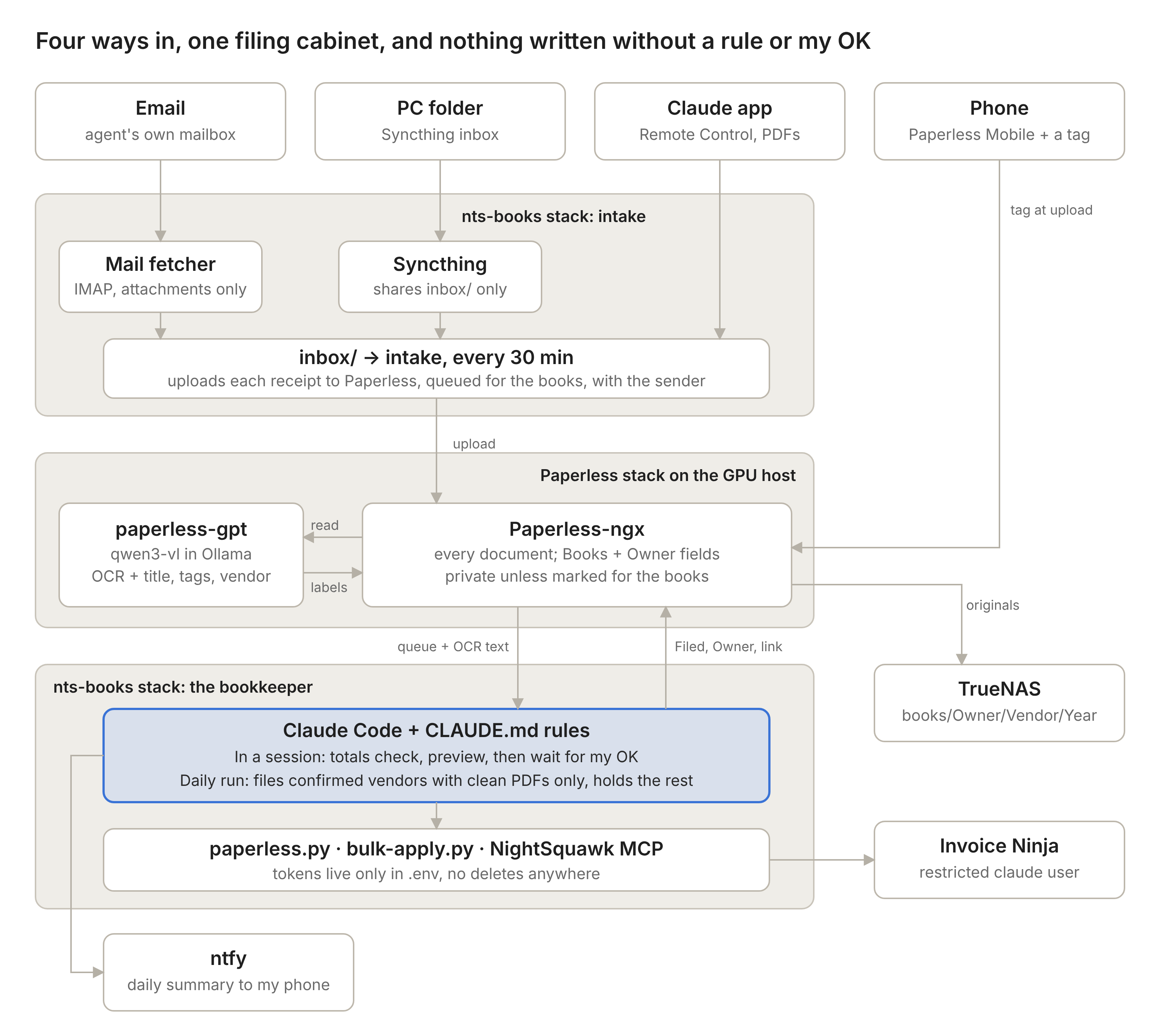
The flow for a receipt now looks like this:
- A receipt arrives: forwarded by email, dropped in my Syncthing folder, or scanned on my phone.
- Paperless stores it and tags it for the AI.
- paperless-gpt sends it to
qwen3-vl:8b-instructrunning in Ollama. Photos and scans get OCR’d; born-digital PDFs keep their own text and never touch the GPU. - Once the AI is done, the document shows up in the agent’s queue with clean text already extracted.
- Claude files it in Invoice Ninja, then marks the Paperless document as filed, with an owner and a link to the expense.
- Paperless moves the file into a
books/<Owner>/<Vendor>/<Year>/folder on the NAS by itself.
The stack
Everything runs in one Dockge stack on the Proxmox LXC that already holds my GPU:
- Paperless-ngx 3.3 with Postgres 18 and Valkey
- paperless-gpt, which does the OCR and labelling through Ollama
- Ollama with
qwen3-vl:8b-instructon a GTX 1080 Ti (11 GB of VRAM; the model uses roughly 6 GB)
Two Paperless settings make the local AI the only reader:
yaml
PAPERLESS_OCR_MODE: "off"                 # quoted: bare off is a YAML boolean
PAPERLESS_ARCHIVE_FILE_GENERATION: "never"
Use the -instruct tag. Plain qwen3-vl:8b is the “thinking” variant, which is slower and wraps its answers in reasoning text.
How it fits together
Storage: database local, documents on the NAS
The original files live on a TrueNAS dataset shared over NFS. The Proxmox host mounts it and bind-mounts it into the LXC, the same pattern I already use for Immich. The database and search index stay on the LXC’s local disk. Postgres on a network share is asking for corruption the first time the link blips.
Two small things that made this painless:
- Mapall on the NFS share. Every write from the client lands as the
paperlessuser on TrueNAS, so there’s no UID juggling between the host, the container and the NAS. chattr +ion the empty mount point. If the NAS isn’t up when the host boots, the folder stays read-only. Paperless gets write errors instead of quietly filling the LXC’s disk.
bash
mkdir -p /mnt/paperless-storage-nas
chattr +i /mnt/paperless-storage-nas
Keeping the agent in its lane
The agent was locked down in the first post (restricted Invoice Ninja user, preview before every write, no deletes). Paperless needed the same treatment, especially since it now holds my medical and banking documents as well.
Two service users, not my token. The local AI and the Claude agent each get their own Paperless user and API token. Neither has a single Delete permission. If a token ever leaks, I revoke one user without touching my own login.
Every document gets me as owner. In Paperless, a document with no owner is visible to every user. So the first workflow on every new document sets the owner to me and gives only the AI user access. Without this, the agent’s user could read my medical aid statements.
The books state lives in custom fields, not tags. This was the most important design decision. paperless-gpt picks tags from my tag list, so a tag like books-filed could end up on the wrong document. Custom fields are off-limits to the model, so they carry the state:
| Field | Values | Set by |
|---|---|---|
| Books | Queued, Held, Filed, Not an expense | Intake, workflows, me, then the agent |
| Owner | NTS, Flat, Personal | Me (preset at upload) or the agent after I approve |
| Invoice Ninja | Link to the expense | The agent |
| Sender | The From address of an emailed receipt | Intake |
Private by default. A document only becomes visible to the agent when it’s marked for the books. On my phone that’s one tag at upload:
| I’m uploading… | Tag |
|---|---|
| A business expense | To NTS |
| A flat expense | To Flat |
| An expense, but I’m not sure whose | To Books |
| Anything personal | nothing |
A Paperless workflow turns the tag into Books = Queued (plus the owner), gives the agent’s user access, and then removes the tag again. If I preset the owner, the agent trusts it. It only argues if the receipt clearly contradicts me, for example a job address that’s obviously the flat.
Teaching an 8B model about South African receipts
The defaults in paperless-gpt are decent, but my first three test documents each found a different weakness. Its prompts are plain template files in a mounted folder, so each fix was a few lines.
Tags: a gas geyser became “Utilities”. The model only sees tag names, and “gas” sounds like a utility. I added a one-line meaning per tag and one rule: buying equipment is Hardware even if it uses gas, water or electricity; Utilities is only for consumption.
Vendors: it picked the parent company. An invoice from MiRO became “Hudaco Trading” (MiRO’s parent company), and a Builders Warehouse slip became “Massmart Retail”. That matters, because the vendor name decides the folder and has to match the vendor in Invoice Ninja. The fix was a rule to use the brand from the letterhead, drop the (Pty) Ltd, and reuse an existing name exactly.
OCR: handwriting. A plumber’s handwritten 550-00 came out as 556. I gave it South African receipt habits: a dash before the cents means .00, copy numbers exactly and never calculate, and mark unclear digits with [?].
That last one deserves honesty: an 8B model on a 1080 Ti will still misread handwriting sometimes. The prompt reduces it, but the real safety net is on the agent’s side:
- Every receipt gets a totals check. Line items have to add up to the subtotal, and subtotal plus VAT has to equal the total. The plumber’s 550 + no VAT ≠ 556 gets flagged immediately.
- Anything with a
[?], or a photo that fails the check, gets looked at by Claude itself. It reads handwriting far better, and it only spends my usage on the few slips that need it. - Photos and scans are never auto-filed in the unattended run. Only born-digital PDFs from confirmed vendors are.
The agent side
The agent never calls the Paperless API directly. Like bulk-apply.py in the first post, there’s one small script that holds the token and can only do a handful of things:
paperless.py check        # setup + counts
paperless.py sweep        # upload inbox/ files to Paperless, queued for the books
paperless.py queue        # download the books queue: originals + OCR text + queue.csv
paperless.py mark ID ...  # Filed / Held / Not an expense, Owner, expense link
paperless.py fix ID ...   # correct a wrong vendor, tags, type or date
queue.csv gives the agent what it needs to decide how far to trust each document. A kind column says whether the text came from the PDF itself (exact) or from the local OCR (check it). An unclear column counts the [?] marks.
Intake (email plus my Syncthing folder) now runs every 30 minutes, so documents are OCR’d and labelled long before the 07:30 daily run. When the agent files an expense, bulk-apply.py marks the Paperless document Filed with the owner and a link straight to the expense. If Paperless hiccups halfway through, re-running finishes the marking without creating the expense twice.
Moving 392 old receipts into Paperless
The old done/ folder held 392 receipts the agent had already filed. I didn’t want them re-processed, I wanted them archived, as Filed documents linked to their existing expenses.
A one-off import-done command uploads each file with its owner taken from the folder, and finds the matching expense:
- from the agent’s own log, by file path;
- by file name, for files that moved when I restructured the folders;
- by the date and amount in the file name (
YYYY-MM-DD_Vendor_Amount.pdf) against an export of Invoice Ninja, and only when exactly one expense matches.
The result: 380 of 392 linked automatically. The rest were R0.00 invoices, a duplicate copy, and one invoice with no expense behind it, which is worth checking. Two rules kept it honest. A personal receipt never gets linked to an expense. And a log entry pointing at an expense I’d since deleted is ignored rather than turned into a dead link.
After that, a dry run said 0 to import, and the old done/ folder was cleared, leaving a checksum manifest behind.
Gotchas
Ollama needs driver 570+ on Pascal. My host and LXC were on Debian’s 535 driver. Ollama’s docs require 570 or newer for compute capability 5.0–6.2 cards, which includes the 1080 Ti. I moved to NVIDIA’s 580 branch, the last one that supports Pascal, using the .run installer with --dkms on the host and --no-kernel-module in the LXC. The two versions must match exactly. Choose the proprietary kernel module: the open one doesn’t support Pascal.
Dockge “Stack name already exists”. I created /opt/stacks/paperless/ with its data folders before creating the stack. Dockge treats any folder there as a stack. touch compose.yaml in it, then “Scan Stacks Folder”, and it shows up.
CSRF verification failed behind the reverse proxy. I set PAPERLESS_PUBLIC_URL, which is a paperless-gpt variable. Paperless itself needs PAPERLESS_URL on the webserver service.
“order: This field may not be null.” Paperless workflows need the Order field filled in. The error is less obvious than the fix.
Matching algorithm “None”, owner cleared. Every tag, document type, custom field and storage path needs both. Paperless’s own auto-matching would fight the AI, and anything with an owner is invisible to the service users.
Correspondents showing as “Private”. Vendors that paperless-gpt creates are owned by the paperless-gpt user, so neither I nor the agent could read their names. A five-minute cron job inside the container clears that owner:
bash
docker compose exec -T -u paperless webserver python3 manage.py shell -c \
  "from documents.models import Correspondent; Correspondent.objects.filter(owner__username__in=['paperless-gpt','claude']).update(owner=None)"
Paperless 3 uses SHA-256 checksums. My upload script confirmed uploads by MD5 and never found its own documents. It now accepts either.
Cloudflare error 1010. Halfway through, every API call from the agent to Invoice Ninja and ITFlow started failing with “Access denied based on your browser’s signature”. That’s Cloudflare’s Browser Integrity Check rejecting anything that isn’t a browser. The LAN ports weren’t an option, because both apps redirect to HTTPS. The fix was a Configuration Rule (Rules → Overview → Create rule) that switches Browser Integrity Check off for just those two hostnames. Both apps still need their logins and API tokens.
How I use it now
- Phone: scan in Paperless Mobile, add
To NTSorTo Flat, upload. Done. - Email: forward invoices to the agent’s mailbox, same as before.
- PC: drop PDFs in the Syncthing folder, same as before.
- Personal paperwork: upload with no tag. It’s OCR’d, labelled, searchable and private.
- Every morning: an ntfy message tells me what was filed and what’s waiting. “Review pending” in a Remote Control session goes through the rest, with Claude reading the text Paperless already extracted.
- Finding anything: search Paperless. “Afrihost 2025”, “geyser”, “warranty”. Even handwritten slips are searchable now.
The split turned out to be the right shape. The local model does the high-volume, low-stakes reading for free. Claude does the judgement calls: whose books something belongs to, which category it goes in, whether it’s a duplicate. Paperless is the one place where everything ends up, filed and linked. And the rule from the first post still holds: nothing gets written to my books without either a confirmed vendor or my approval.