TL;DR: A guide to implementing offsite homelab backups by syncing a local Proxmox Backup Server (PBS) directly to Storj’s decentralized S3-compatible cloud storage. Taking advantage of PBS’s native S3 support and Storj’s free egress, the author explains how to configure S3 endpoints with path-style access, create a remote datastore, and set up a pull-based sync job to automatically upload deduplicated and doubly-encrypted backups every night.
If you’re running Proxmox Backup Server (PBS) at home or in a small business, you probably already know how good it is at deduplicating and storing your VM and container backups efficiently. But what happens if your server dies, or your house burns down? You need an offsite copy — and Storj is a surprisingly great fit for this.
Storj is a decentralised cloud storage provider with an S3-compatible API, competitive pricing, and free egress — meaning you don’t pay to restore your backups. In this post I’ll walk through exactly how I set up PBS to automatically sync backups to Storj as an offsite copy.
What We’re Building
The goal is simple: keep your existing local PBS datastore as-is, and add a nightly sync job that copies your backups to Storj. PBS 3.x and later supports S3 object storage natively (currently in tech preview), so no third-party tools are required.
Here’s the high-level flow:
- Create a bucket and S3 credentials on Storj
- Add a Storj S3 endpoint in PBS
- Create an S3-backed datastore in PBS pointing at your bucket
- Set up a sync job to copy from your local datastore to Storj nightly
Step 1: Set Up Storj
If you don’t have a Storj account, sign up at storj.io. Once you’re in:
- Create a new bucket — I named mine
pbs-backups - Go to Access Keys and create a new S3-compatible access grant, scoped only to your bucket
- Note down your Access Key, Secret Key, and the endpoint:
https://gateway.storjshare.io
Scoping the credentials to just the one bucket is good practice — if the keys are ever compromised, the blast radius is limited.
Step 2: Add the S3 Endpoint in PBS
In the PBS web UI, navigate to Configuration → Storage/Disks and add a new S3 endpoint. Fill it in as follows:
- S3 Endpoint ID: a friendly name, e.g.
storj - Endpoint:
https://gateway.storjshare.io - Port: leave as default (443)
- Path Style: check this box — this is important, Storj requires path-style access
- Region: leave as default — Storj ignores this field
- Access Key / Secret Key: paste your Storj credentials
- Fingerprint: leave blank (Storj uses a valid public certificate)
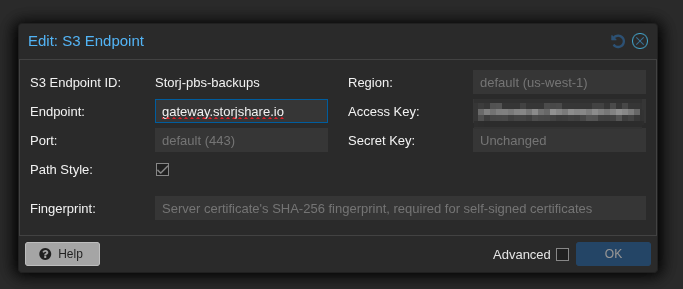
The Path Style checkbox is the one people most commonly miss. Without it, requests will fail because Storj doesn’t support virtual-hosted bucket URLs.
Step 3: Create the Storj Datastore
Now go to Datastore → Add Datastore and set the type to S3 (tech preview). Fill in:
- Name: e.g.
Storj_pbs-backups - Local Cache: a path on your PBS server for chunk metadata caching, e.g.
/var/lib/proxmox-backup/s3cache/storj— create this first withmkdir -p /var/lib/proxmox-backup/s3cache/storj - S3 Endpoint ID: select
storj - Bucket:
pbs-backups - GC Schedule: daily is fine
- Prune Schedule: set this to a more relaxed retention than your local store, or disable it entirely if you want Storj to be your long-term archive
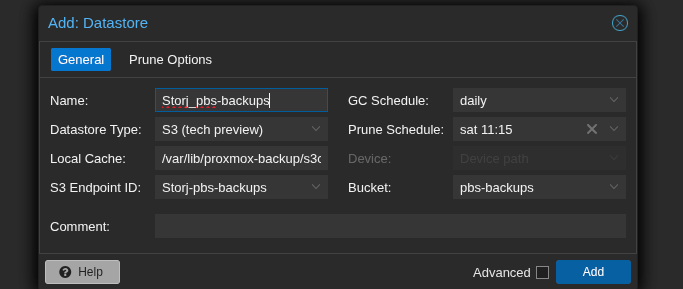
The local cache directory is just for metadata — it doesn’t store full backup data, so a few GB is plenty.
Step 4: Set Up the Sync Job
This is where it comes together. You might expect to create a “push” job from your local datastore to Storj — but PBS push jobs only support remote PBS instances as targets, not S3 datastores.
Instead, create a pull job from the Storj datastore side, with Location set to Local. It ends up doing the same thing — pulling from your local datastore into the Storj datastore — just initiated from the other direction.
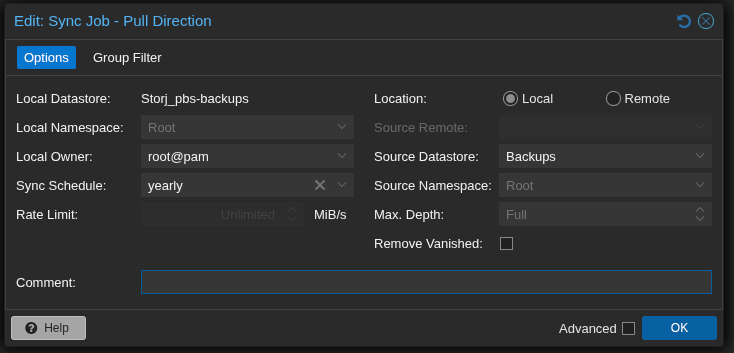
Go to Datastore → Storj_pbs-backups → Sync Jobs → Add (Pull Direction):
- Local Datastore:
Storj_pbs-backups(destination) - Location: Local
- Source Datastore: your local
Backupsdatastore - Sync Schedule: set this to run after your regular backup jobs — if backups run at 22:00, set sync to something like 01:00
- Max Depth: Full
- Remove Vanished: leave unchecked unless you want deletions on the local store to propagate to Storj
A Few Things to Know
Deduplication still works
PBS stores data as fixed-size chunks, and this carries over to S3. On subsequent syncs, PBS checks which chunks already exist in the bucket and only uploads new or changed ones. The first sync will upload everything; after that, syncs are much faster and lighter on bandwidth.
The first sync will be slow
Don’t be alarmed if throughput seems low — around 30 Mbps is typical even on a fast connection. This is because PBS has to make a separate API call to check each chunk before uploading, and the round-trip latency to Storj’s gateway adds up. For 200 GB this can take 15+ hours, so kick it off overnight with Run Now.
You can’t rate-limit local-to-local sync jobs
Because PBS treats both datastores as local, the rate limit field in the sync job is unavailable. The practical solution is to schedule the job during off-hours rather than running it during the day.
Double encryption
PBS encrypts backup data at the client level before it ever reaches PBS. Storj also encrypts data at rest on their end. So your offsite backups end up encrypted twice, which is a nice bonus.
Free egress on Storj
One of the underrated advantages of Storj over AWS S3 or Backblaze B2 is that egress (downloading your data) is free. If you ever need to restore from your offsite copy, you won’t get a surprise bandwidth bill.
Wrapping Up
Once the first sync completes, you’ll have a fully automated offsite backup pipeline: your PVE hosts back up to PBS, PBS deduplicates and stores locally, and every night PBS syncs new chunks to Storj. All without any third-party tools or scripts.
It’s one of those setups that feels like it should be more complicated than it is. If you’re already running PBS, adding Storj as an offsite target is well worth the hour it takes to configure.